Tag: cell phone repair

  • How to Check Mobile Phone Battery Using a Multimeter

    How to Check Mobile Phone Battery Using a Multimeter

    A mobile phone battery is the heart of every smartphone. No matter how powerful the processor or how advanced the display, a weak battery can make even a premium device unusable. For mobile repair technicians, battery-related complaints are among the most common issues faced in daily work.

    Customers often say things like “phone is not charging,” “battery drains too fast,” or “device switches off suddenly.” Behind these simple complaints can be multiple causes. That is why learning how to correctly check a mobile phone battery is a core skill for every technician, whether beginner or advanced.

    This guide explains battery testing in a clear, practical, and professional way. It avoids myths, focuses on real workshop practices, and helps you make confident repair decisions.

    “Power problems are rarely complicated. They only become expensive when testing is skipped.”


    A Mobile Phone Battery is Also Called

    In the repair industry, a mobile phone battery may be referred to as:

    • Rechargeable battery
    • Lithium-ion battery
    • Li-ion battery
    • Lithium-polymer battery
    • Li-Po battery
    • Power cell
    • Battery pack

    Although these names sound different, they often refer to the same function: storing and delivering electrical energy safely to the device.


    Types of Mobile Phone Batteries Used Today

    Understanding battery type helps in correct diagnosis and replacement.

    Lithium-Ion Battery (Li-ion Battery)

    This is the most widely used battery type in smartphones. Li-ion batteries are reliable but sensitive to heat, overcharging, and deep discharge.


    Lithium-Polymer Battery (Li-Po Battery)

    A lithium-polymer battery is a more flexible version of lithium technology. They have slim and lightweight design, can be shaped to fit thin phones and have better safety design compared to older lithium cells. They are often used in modern smartphones and iPhones

    In practical repair work, Li-ion and Li-Po batteries are tested in almost the same way.


    Minimum and Maximum Voltage of a Cell Phone Battery

    Knowing voltage limits is extremely important for battery diagnosis.

    Standard Voltage Ranges

    For most mobile phone batteries:

    • Minimum safe voltage: 3.0V
    • Nominal voltage: 3.6V to 3.7V
    • Fully charged voltage: 4.2V
    • Over-voltage (danger zone): Above 4.25V

    If a battery voltage drops below 3.0V, it is considered deeply discharged and may not recover safely.

    A battery showing zero or very low voltage is usually damaged. However, if it has not been used for a long time, it should be recharged once and then tested for proper performance.

    Problems Caused by a Faulty Mobile Phone Battery

    A defective mobile phone battery can create many confusing issues that often look like software or motherboard faults.

    • Dead phone – device does not power ON at all
    • Fast draining – battery drops quickly even after full charge
    • Stuck at logo / boot loop – phone restarts during startup
    • Auto switch OFF – shuts down suddenly, often below 40%
    • Swollen (pregnant) battery – back cover or display lifts
    • Charging issues – slow charging, no charging, or unstable charging
    • Works only on charger – phone turns OFF when unplugged
    • Overheating – battery heats during charging or normal use
    • Wrong battery percentage – sudden drops or jumps in charge level

    Technician note: Always check or replace the battery first before assuming software or motherboard problems.


    Tools Required to Check a Mobile Phone Battery

    Every repair technician should have:

    • Digital multimeter
    • Known good battery (for comparison)
    • Charging cable and adapter
    • DC power supply (advanced level)
    • Basic hand tools

    Among these, the multimeter is the most important diagnostic tool.


    How to Check Mobile Phone Battery Voltage Using a Multimeter

    This is the most reliable and professional method.

    Step-by-Step Battery Voltage Test

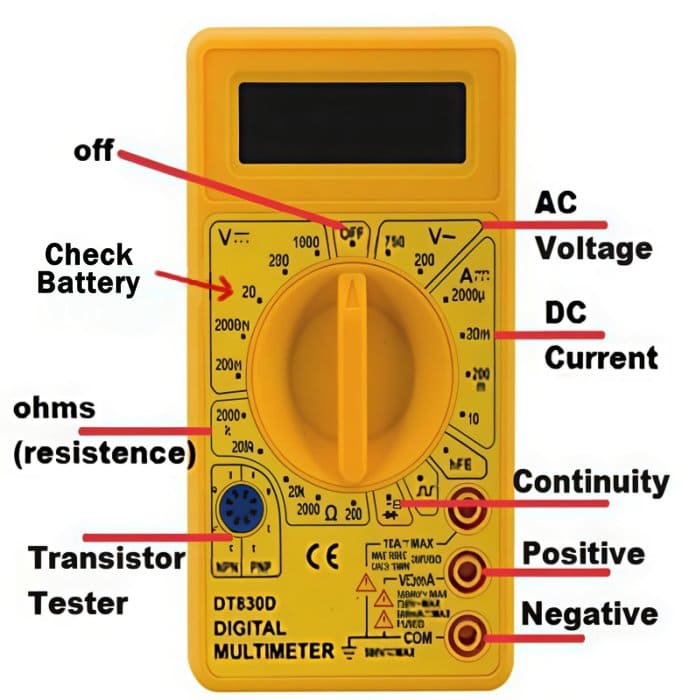
    1. Set the multimeter to DC voltage mode
    2. Select the 10V / 20V DC range (or auto-range)
    3. Place the red probe on the positive (+) terminal
    4. Place the black probe on the negative (–) terminal
    5. Read the voltage displayed
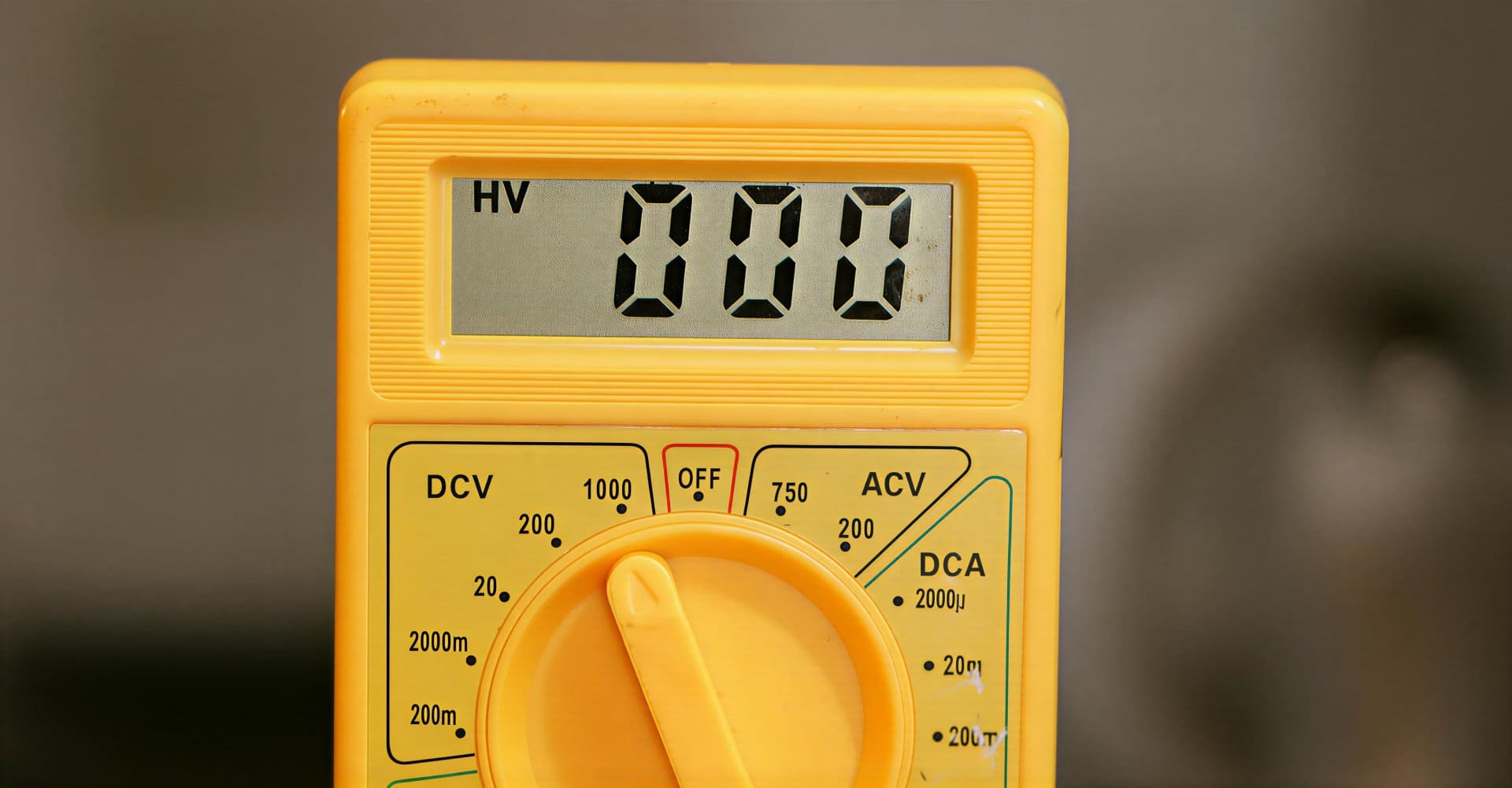
    how to check mobile phone battery with a multimeter

    How to Interpret the Reading

    • 4.1V – 4.2V → Battery fully charged
    • 3.7V – 3.9V → Battery in good condition
    • 3.3V – 3.6V → Battery partially discharged
    • Below 3.0V → Battery weak or damaged
    • 0V → Battery dead or protection circuit triggered

    A mobile phone battery showing below 3.7V on a multimeter is partially discharged. Some smartphones may still power ON around 3.3–3.6V, but a weak battery often fails to deliver enough current during startup, causing the phone to not turn ON or to switch OFF immediately. Below 3.3V, most smartphones will not power ON at all due to low-voltage protection.

    This test gives you a quick and accurate picture of the battery’s current charge level.


    Checking Battery Terminals and Contacts

    Sometimes the battery is fine, but power is not delivered properly.

    Inspect:

    • Battery terminals for corrosion
    • Bent or damaged contacts
    • Loose battery connectors
    • Dirt or oxidation on pins

    Poor contact can mimic battery failure.
    Always clean and inspect before declaring a battery faulty.


    A Funny but Unsafe Traditional Battery Checking Method (For Knowledge Only)

    There is an old and widely known method used by some traditional mobile phone repair technicians.

    They lightly touch the tip of their tongue to the positive (+) terminal of the battery.
    If a mild tingling or “spicy” sensation is felt, the battery is assumed to have some charge.
    If no sensation is felt, the battery is considered discharged.

    This method may give a rough idea, but it is unsafe, unhygienic, and unprofessional.

    It is mentioned here only for awareness and knowledge, and it is strongly advised not to use this method, except in extreme emergencies where no tools are available.

    A multimeter is safer, accurate, and professional.


    Why Multimeter Testing Is Not Enough for Fast Draining Batteries

    Many technicians believe that if voltage is normal, the battery is good. This is not always true.

    A multimeter only shows:

    • Current voltage
    • Surface charge level

    It does not show:

    • Internal chemical health
    • Capacity loss
    • Discharge speed

    This is why fast-draining batteries often confuse beginners. If your smartphone battery is draining very fast, know how to fix if a Phone Battery Drains Fast Even When Idle


    How to Check a Fast Draining Mobile Phone Battery

    If a battery drains very quickly even after full charging, simple voltage testing will not reveal the problem.

    This happens when:

    • Battery chemicals have weakened
    • Internal resistance has increased
    • Battery capacity has dropped significantly

    Practical Technician Method

    The most reliable method is replacement testing:

    1. Fully charge the existing battery
    2. Insert a known good or new battery into the same phone
    3. Use the phone normally
    4. Observe battery performance

    If the problem disappears:

    • The old battery is faulty

    If the problem remains:

    • The issue is with software, charging circuit, or power management IC

    This method reflects real-world usage and gives accurate results.


    Common Signs of a Bad Mobile Phone Battery

    Watch for these symptoms:

    • Battery percentage drops suddenly
    • Phone switches off at 20–30%
    • Battery heats up during charging
    • Phone restarts randomly
    • Charging takes too long
    • Battery drains even in idle mode

    Any two or more symptoms usually indicate battery replacement is needed.


    Charging Test: Another Important Battery Check

    Battery testing is incomplete without charging observation.

    Check:

    • Charging current stability
    • Charging time consistency
    • Battery temperature rise

    A battery that heats excessively during charging is unsafe and should be replaced immediately.


    Built-In vs Removable Battery Considerations

    Removable Battery Phones

    • Easy voltage testing
    • Easy replacement
    • Lower labor risk

    Non-Removable Battery Phones

    • Require careful opening
    • Risk of flex damage
    • Adhesive removal needed

    Regardless of design, battery testing principles remain the same.


    Choosing the Right Replacement Battery

    When replacing a battery:

    • Match exact model number
    • Prefer original or OEM-quality battery pack
    • Avoid cheap, low-capacity duplicates
    • Check voltage before installation

    A poor-quality power cell can damage the device or reduce customer trust.


    Technician-Level Best Practices

    • Never short battery terminals intentionally
    • Do not overcharge externally
    • Store batteries at safe voltage levels
    • Avoid swollen or leaking batteries
    • Dispose damaged batteries properly

    “Battery safety is not optional. One mistake can damage the phone or injure the technician.”


    Summary: How to Check a Mobile Phone Battery the Right Way

    To correctly diagnose a mobile phone battery:

    1. Identify battery type (Li-ion or Li-Po)
    2. Check voltage using a multimeter
    3. Understand minimum and maximum voltage limits
    4. Inspect terminals and contacts
    5. Test charging behavior
    6. Replace temporarily to confirm fast drain issues

    This approach works for Android phones, iPhones, and most modern smartphones.


    Final Thoughts

    Battery testing is not about speed. It is about accuracy. A technician who understands voltage behavior, chemical wear, and real-world usage can solve power issues confidently and professionally.

    Learning these fundamentals not only improves repair quality but also builds long-term customer trust.

  • How to Test a Smartphone LCD Screen Before Replacement

    How to Test a Smartphone LCD Screen Before Replacement

    Replacing a smartphone LCD screen without proper testing is one of the most common and costly mistakes in mobile repair. A phone may show a black screen, distorted display, or flickering image, but the actual fault may not always be the LCD panel itself. Many display issues are caused by battery problems, loose connectors, software glitches, or board-level faults.

    For repair technicians, learning how to test a smartphone LCD screen before replacement is essential. It saves time, reduces unnecessary part changes, and builds customer trust. Whether you work on Android phones or iPhones, the testing principles remain similar, with a few important differences.

    “Good repair work starts with confirmation, not assumption.”
    That principle applies perfectly to LCD diagnosis.

    This guide explains step-by-step LCD testing methods, practical workshop checks, and common mistakes to avoid. It is written for both beginner and experienced technicians.


    Smartphone LCD Screen: Names and Common Terms Used

    A smartphone LCD displays images, text, videos, system interfaces, and touch feedback when combined with a digitizer. In repair and user language, an LCD screen may also be called:

    • Phone screen
    • Mobile screen
    • Display
    • Display panel
    • Screen module
    • LCD panel
    • Display assembly
    • Touch and display unit
    • Folder
    • Screen combo

    Although modern phones may use OLED or AMOLED technology, technicians still commonly use the term LCD screen to refer to the complete display unit.


    Common LCD-Related Complaints from Customers

    Before testing, understand the complaint clearly. Customers usually describe display problems in simple words, such as:

    • Screen is black but phone is ON
    • Display is white or blank
    • Lines or spots on the screen
    • Flickering or dim display
    • Touch works but no image
    • Screen shows logo and then goes black

    Each symptom points to a different diagnostic path. Jumping straight to replacement can lead to wrong conclusions.


    Important: Check the Battery Before Testing the LCD

    This step is often ignored.

    A weak battery can cause LCD-related symptoms even when the screen is perfectly fine.

    Battery Voltage Reference (Very Important)

    For most smartphones:

    • Minimum operating voltage: around 3.3V
    • Nominal voltage: 3.6V – 3.7V
    • Fully charged voltage: 4.2V
    • Maximum safe voltage: around 4.25V

    Below approximately 3.3V, most smartphones will not power ON at all.

    If the battery is weak, unstable, or deeply discharged, the phone may:

    • Fail to boot
    • Restart repeatedly
    • Show a black or flickering display

    Always test or replace the battery first before blaming the LCD screen.


    Tools Required to Test a Smartphone LCD

    A professional technician should have:

    • Known good battery
    • Charging cable and adapter
    • Digital multimeter
    • Screwdrivers and opening tools
    • Known working LCD (for cross-testing)
    • Clean workspace with proper lighting

    Advanced tools like DC power supplies are useful but not mandatory for basic LCD testing.


    Step 1: Visual Inspection Without Opening the Phone

    Start with what you can see.

    Check for:

    • Cracks on the screen or glass
    • Ink-like black spots (LCD bleed)
    • White patches or discoloration
    • Uneven brightness
    • Lines across the display

    Cracked glass does not always mean the LCD is damaged, and an unbroken screen does not guarantee a healthy display.


    Step 2: Check if the Phone Is Actually Powering ON

    Many “LCD problems” are actually power issues.

    Confirm:

    • Vibration when power button is pressed
    • Sound during charging
    • Notification sounds
    • Backlight glow in dark environment

    If the phone shows signs of life but no image, LCD testing is required.


    Step 3: Torch Light Test (Basic but Useful)

    This is a quick field test.

    Steps:

    1. Turn ON the phone
    2. Shine a bright torch or flashlight on the screen at an angle
    3. Look closely for faint images

    If faint images are visible:

    • The display panel is working
    • Backlight or power delivery may be faulty

    This method works on many LCD-based displays and is especially helpful for beginners.


    Step 4: External Display or Screenshot Test (Android vs iPhone)

    For Android Phones

    • Take a screenshot using button combination
    • Connect phone to a PC
    • View the screenshot file

    If the screenshot looks normal:

    • The phone is generating display output
    • The LCD screen or display connection is likely faulty

    For iPhones

    • Use screen mirroring or backup tools
    • Check if display output is visible externally

    This helps separate software and GPU output from physical LCD failure.


    Step 5: Test Using a Known Good LCD Screen

    This is the most reliable technician method.

    Steps:

    1. Open the phone carefully
    2. Disconnect the existing display
    3. Connect a known working LCD screen
    4. Power ON the device

    If the phone displays properly:

    • Original LCD screen is faulty

    If the issue remains:

    • Problem may be battery, connector, or motherboard related

    This method prevents unnecessary LCD replacement.

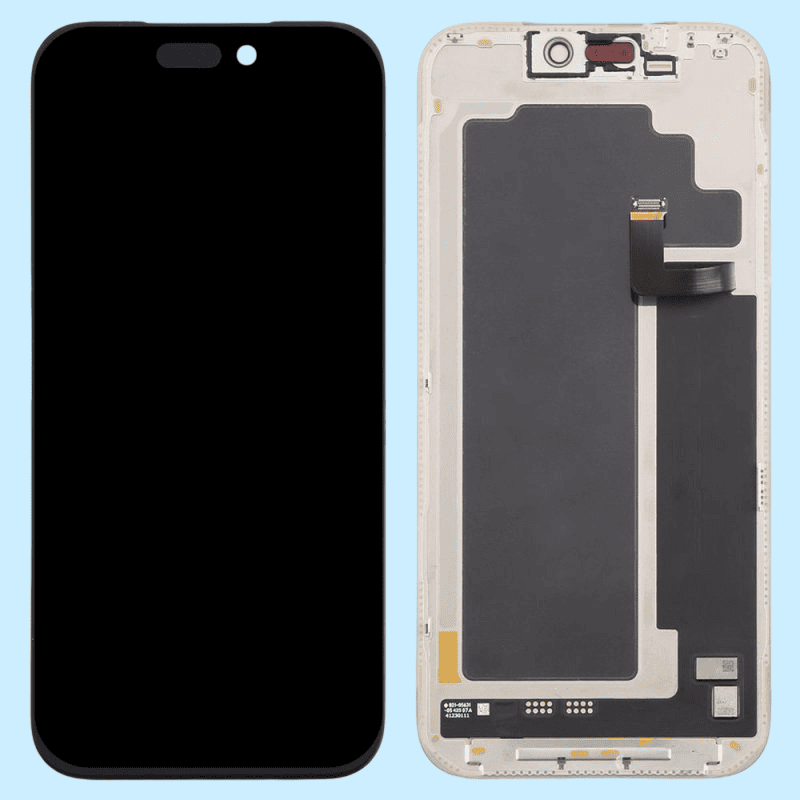
    apple iPhone 17 pro max display lcd screen replacement spare part

    Step 6: Check LCD Connectors and Flex Cables

    Many display problems are caused by poor connections.

    Inspect Visually:

    • Bent or broken connector pins
    • Dust or corrosion on contacts
    • Torn flex cables
    • Improper seating of connectors

    Clean gently if needed and reseat connectors properly before final testing.


    Android vs iPhone: Additional LCD Checks

    Additional Points for Android Devices

    • Use hardware test codes (where available)
    • Boot into safe mode to rule out app conflicts
    • Check display settings and brightness controls

    Additional Points for iPhones

    • Ensure all screws are placed correctly
    • Check proximity sensor and earpiece alignment
    • Confirm display compatibility with the model

    Improper fitting can affect display behavior, especially in iPhones.


    LCD vs Touch Problem: How to Identify

    Understanding the difference saves time.

    LCD Issue Signs

    • No image
    • Lines or discoloration
    • Flickering display
    • White or black screen

    Touch/Digitizer Issue Signs

    • Image visible but touch not responding
    • Partial touch failure
    • Ghost touch

    A full display replacement may not always be necessary if only the touch layer is faulty.


    Can Software Cause LCD Problems?

    Yes, but rarely.

    Software-related display issues may include:

    • Stuck logo due to firmware corruption
    • Display glitches after updates
    • Incompatible ROMs

    In such cases:

    • Software restore or flashing may help
    • Hardware replacement should be the last step

    Common Technician Mistakes to Avoid

    • Replacing LCD without battery testing
    • Ignoring connector inspection
    • Assuming black screen always means dead LCD
    • Using low-quality display panels
    • Skipping cross-testing

    Testing first saves money, parts, and reputation.


    Choosing the Right Replacement LCD Screen

    If replacement is confirmed:

    • Match exact model and version
    • Prefer original or OEM-grade display
    • Check brightness and color accuracy
    • Test before final assembly

    A poor-quality screen leads to callbacks and dissatisfaction.


    Real Workshop Insight

    In daily repair work, many “LCD problems” are solved by fixing battery issues, reseating connectors, or correcting improper assembly. True LCD failure is common—but not as common as assumed.

    “Diagnosis is the skill that separates a repairer from a parts changer.”


    Summary: How to Test a Smartphone LCD Screen Before Replacement

    To test a smartphone LCD properly:

    1. Check battery voltage and condition
    2. Confirm the phone powers ON
    3. Inspect visually
    4. Use torch light test
    5. Cross-test with known good LCD
    6. Inspect connectors and flex cables
    7. Consider Android and iPhone-specific checks

    This process works for Android phones, iPhones, and most modern smartphones.


    Final Thoughts

    LCD testing is not about speed. It is about certainty. A technician who follows a structured testing process avoids mistakes, saves money, and delivers professional-level repairs.

    Master this skill, and LCD replacement will never be a guess again.

  • How to Use a Soldering Iron for Cell Phone Repair

    How to Use a Soldering Iron for Cell Phone Repair

    A soldering iron is one of the most important tools in cell phone repair. Whether you work on Android devices, iPhones, or basic mobile phones, soldering helps restore broken connections on the PCB. Many phone problems exist not because a component is dead, but because its solder joints have weakened, cracked, or completely disconnected.

    Modern smartphones use compact motherboards. Components are tiny. Tracks are thin. One careless move can damage the board permanently. That is why soldering is considered both a basic requirement and an advanced skill in mobile phone repairing.

    “Good soldering is invisible. Bad soldering is easy to spot.”

    This guide explains how to use a soldering iron correctly for cell phone repair, covering tools, preparation, techniques, mistakes, and real technician-level insights. It is written for beginners as well as experienced repair technicians.


    Introduction: Why Soldering Matters in Phone Repair

    A soldering iron is used to join metal parts using solder wire. In mobile phones, it is mainly used on the green-colored PCB (Printed Circuit Board) to attach spare parts or repair broken electrical connections.

    In repair shops, it is also commonly called:

    • A soldering station
    • A soldering pen
    • A micro soldering iron (for fine work)

    Most technicians today use a temperature-controlled soldering station because it provides stable heat and reduces board damage.


    Why Phone Components Need Resoldering

    Over time, solder joints inside a smartphone can fail. Common reasons include:

    • Physical shock or phone drop
    • Loose charging cable usage
    • Excessive heat
    • Repeated plugging and unplugging
    • Manufacturing stress points

    When solder joints fail, the component may still work but loses contact with the PCB.

    Common parts that often require soldering include:

    • Charging port
    • Battery connector
    • Power button
    • Volume keys
    • Headset connector
    • Antenna contact points
    • LCD connector (in selected models)
    • Microphone or speaker terminals

    In many low-cost or Chinese mobile phones, almost all components are soldered, including mic, speaker, and ringer. This reduces manufacturing cost but increases repair difficulty.


    Soldering Skill: Training vs Practice

    Soldering is not something you master overnight. Watching videos helps, but practice matters more than theory.

    Many self-taught technicians learned soldering by:

    • Practicing on dead phones
    • Removing and resoldering old components
    • Experimenting with different temperatures and tips

    Mobile phone soldering is more delicate than soldering computer motherboards or laptop boards. The margin for error is small.

    “The difference between a repair and a board replacement is often just soldering skill.”


    Types of Soldering Tools Used in Phone Repair

    1. Soldering Iron / Soldering Station

    Used for:

    • Connector soldering
    • Jumper wire work
    • Small component repair

    Temperature control is essential for smartphone boards.

    2. Micro Soldering Iron

    Used for:

    • IC legs
    • Tiny pads
    • Precision rework

    3. Soldering Pen

    Lightweight tool, suitable for beginners but limited in advanced work.

    4. Hot Air Rework Station

    Used for:

    • IC removal
    • BGA chips
    • Shield removal

    This article focuses mainly on the soldering iron, but advanced technicians often use both tools together.


    Choosing the Right Soldering Iron for Mobile Repair

    A good soldering setup should include:

    • Temperature control
    • ESD-safe design
    • Interchangeable fine tips
    • Stable heating element

    Avoid cheap non-regulated irons. They overheat pads and damage PCBs.

    Recommended temperature range for phone repair:

    • Lead solder: 320–350°C
    • Lead-free solder: 350–380°C

    Always start lower and increase gradually.


    Importance of ESD Safety in Smartphone Repair

    Modern smartphones are sensitive to static electricity. A small discharge can damage ICs silently.

    Basic ESD precautions include:

    • ESD-safe soldering iron
    • Grounded work surface
    • Anti-static wrist strap
    • Avoid synthetic clothing

    Ignoring ESD protection is one of the biggest hidden causes of repair failure.


    Role of Soldering Flux in Phone Repairs

    Soldering flux is not optional. It is essential.

    Flux:

    • Improves solder flow
    • Prevents oxidation
    • Reduces heat damage
    • Creates stronger joints

    Always use quality flux, especially for micro soldering. Avoid acidic or low-grade flux that leaves corrosive residue.


    Step-by-Step: How to Use a Soldering Iron for Cell Phone Repair

    Step 1: Prepare the PCB Surface

    Before soldering:

    • Clean the solder points using the iron tip
    • Remove old solder if required
    • Make the pads flat and shiny

    Dirty pads cause weak joints.


    Step 2: Heat the Soldering Iron Properly

    • Switch on the soldering station
    • Allow it to heat for around 2 minutes
    • Confirm stable temperature before starting

    Never solder with a half-heated iron.


    Step 3: Hold the Component Correctly

    • Right-handed technicians usually hold:
      • Component with left hand
      • Iron with right hand
    • Use precision tweezers for small parts

    Never hold components directly with fingers near heat.


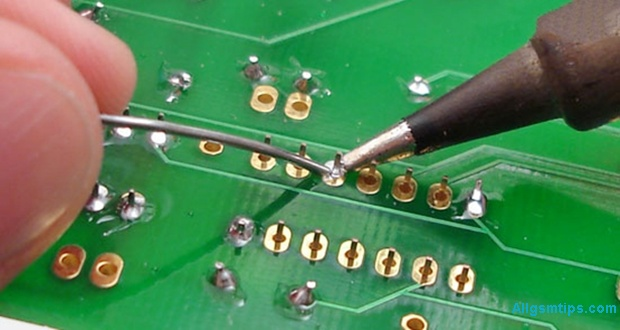
    Step 4: Apply Solder Wire Correctly

    • Take a small amount of solder wire
    • Touch it to the iron tip
    • Position the component on the PCB
    • Touch the joint briefly

    Less solder is always better than excess solder.


    Step 5: Allow the Joint to Cool Naturally

    • Remove the iron tip
    • Do not move the component
    • Let the joint cool for a few seconds
    • Check strength manually

    If it looks dull or weak, resolder it.

    how to do soldering in mobile phone repair

    Making Jumpers Using a Soldering Iron

    Jumpers are used when PCB tracks are broken. This is advanced-level repair.

    Jumpers are usually made using:

    • Thin copper wire
    • Enamel-coated jumper wire

    Only attempt jumper work if you understand circuit paths. Otherwise, you may cause short circuits.

    If you do not repair motherboards at circuit level, you do not need jumper skills.


    Common Soldering Mistakes Technicians Make

    Avoid these common errors:

    • Overheating PCB pads
    • Using excessive solder
    • Not using flux
    • Dragging pads accidentally
    • Solder bridges between pins
    • Using blunt or dirty tips

    Most motherboard damage happens due to impatience, not lack of tools.


    Beginner Tips to Improve Soldering Skills Faster

    • Practice on dead smartphones
    • Start with charging ports
    • Use magnification
    • Clean tips frequently
    • Maintain steady hand posture

    Consistency improves accuracy.


    Advanced Technician Tips

    For experienced repair professionals:

    • Use different tips for different jobs
    • Combine hot air and iron strategically
    • Preheat boards for complex work
    • Inspect joints under microscope
    • Clean flux residue after repair

    Professional repair is about control, not speed.


    Soldering Iron vs Hot Air: When to Use What

    TaskBest Tool
    Charging portSoldering iron
    Button flexSoldering iron
    IC removalHot air
    Shield removalHot air
    Jumper wireSoldering iron

    Knowing the right tool saves boards.


    Safety Tips While Soldering Mobile Phones

    • Never touch hot tip
    • Work in ventilated area
    • Avoid inhaling fumes
    • Keep tools organized
    • Switch off iron after use

    Safety habits protect both technician and device.


    Is Soldering Still Relevant in Modern Smartphones?

    Yes. Despite increasing modular designs, soldering remains essential for:

    • Charging issues
    • Power failures
    • Network problems
    • Audio faults
    • Board-level repair

    Technicians who master soldering earn more and solve deeper issues.

    “Replacing parts is easy. Repairing boards builds real skill.”


    Who Should Learn Soldering in Mobile Repair?

    • Beginners entering phone repair
    • Advanced technicians upgrading skills
    • DIY enthusiasts
    • Electronics students
    • Service center professionals

    Soldering knowledge expands your repair capability significantly.


    Final Thoughts

    Using a soldering iron for cell phone repair is both an art and a technical skill. It demands patience, practice, and respect for the device. With the right tools, correct technique, and steady improvement, you can handle everything from simple connector repairs to advanced motherboard work.

    Start small. Practice often. Focus on quality, not speed.

    A well-made solder joint can bring a dead smartphone back to life.

  • How to Make Jumpers in Mobile Phone Repair to Fix Open Tracks

    How to Make Jumpers in Mobile Phone Repair to Fix Open Tracks

    Jumper work is one of the most important skills in mobile phone hardware repair. When a smartphone comes to a repair shop with charging problems, no display, no power, or dead keys, the fault is often not the component itself—but a broken track on the PCB.

    This article explains how to make jumpers in mobile phone repair to fix open tracks in a clear, practical, and technician-friendly way. It is written for beginners as well as working technicians who want to strengthen their fundamentals. The focus is on real repair logic, not shortcuts or myths.

    “Track repair is not about soldering wires randomly. It is about understanding the circuit and restoring the original path.”


    What Is a Track in a Mobile Phone PCB?

    A track is a thin copper pathway on a printed circuit board (PCB) that carries current and signals between components. These tracks connect:

    • ICs (integrated circuits)
    • Resistors and capacitors
    • Charging ports
    • Display connectors
    • Audio, network, and power sections

    In modern smartphones, tracks are:

    • Extremely thin
    • Spread across multiple PCB layers
    • Often hidden inside the board

    Because of this, track damage is not always visible to the naked eye.


    What Does an “Open Track” Mean?

    An open track means the electrical path is broken. Current cannot flow from one point to another.

    Common reasons for open tracks:

    • Water or liquid damage
    • Physical impact or bending
    • Corrosion over time
    • Excessive heat during previous repairs
    • Improper soldering or component removal

    When a track is open, the connected component will not receive proper voltage or signal, even if the part itself is perfectly fine.


    What Is Jumper Work in Mobile Phone Repair?

    Jumper work is the process of restoring a broken electrical path by creating an alternate connection using a thin wire. This wire replaces the damaged section of the PCB track.

    In simple words:

    • Original track = damaged
    • Jumper wire = new path

    If done correctly, the circuit behaves as if the track was never broken.


    When Do You Need to Make a Jumper?

    Jumper repair is required only after proper diagnosis.

    Common situations where jumper work is needed:

    • Charging section not working despite a good charging port
    • Phone dead even after battery and IC checks
    • Display backlight missing
    • Network issues due to broken RF lines
    • Speaker, mic, or vibrator not functioning

    Important:
    Never make a jumper without confirming an open track. Random jumpers can damage the device further.


    How to Confirm That a Track Is Broken

    Before making any jumper, you must prove that the track is open.

    Step 1: Check the Faulty Section

    First, identify what is not working:

    • Charging
    • Power
    • Display
    • Audio
    • Network

    Replace or test the component if required. A faulty part should be ruled out first.


    Step 2: Use a Digital Multimeter (Continuity Mode)

    Set your multimeter to continuity mode.

    • Place one probe on the starting point of the track
    • Place the other probe on the ending point

    If you hear a beep, the track is fine.
    If there is no beep, the track is open.

    This is the most reliable basic test in mobile phone repairing.

    Also read: How to Use a Multimeter in Mobile Phone Repairing


    Why Tracks Are Harder to Trace in Smartphones

    Older mobile phones had:

    • Single or double-layer PCBs
    • Visible copper lines

    Modern smartphones have:

    • 7 to 10 PCB layers or more
    • Very compact designs
    • Buried internal tracks

    Because of this, technicians rely on:

    • Jumper diagrams
    • Schematic diagrams
    • Boardview files
    • Logical circuit understanding

    Methods to Find Tracks for Jumper Work

    There are three practical ways technicians trace tracks today. Each has its own importance.


    Method 1: Using Jumper Diagrams (Most Common Method)

    Jumper diagrams are images that show:

    • Test points
    • Component connections
    • Alternative jumper locations

    These diagrams are widely used because they are easy to understand, even for beginners.

    How to search jumper diagrams in Google correctly:

    Use clear and specific search terms, such as:

    • “Samsung Galaxy s24 charging jumper”
    • “iPhone 17 backlight jumper solution”
    • “Redmi Note 15 no power jumper diagram”
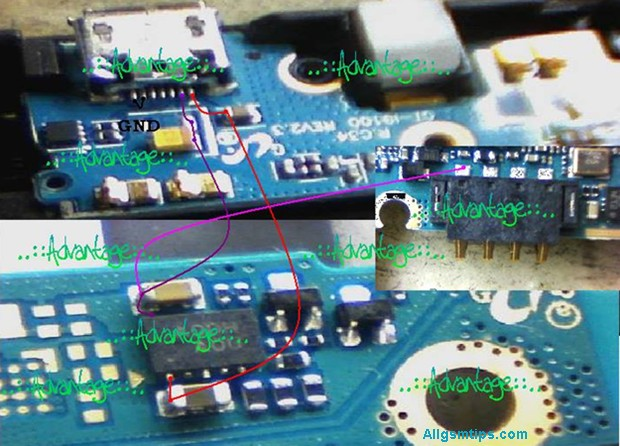
    sample jumper diagram f a mobile phone

    Avoid vague searches.


    How to Use a Jumper Diagram Properly

    1. Identify the two points shown in the diagram
    2. Check continuity between them using a multimeter
    3. If continuity is missing, prepare to make a jumper
    4. Clean both solder points properly
    5. Solder a thin jumper wire between the points

    If done correctly, the fault often gets resolved immediately.

    Technician tip:
    Always cross-check with more than one diagram if available. Some images online can be misleading.


    Method 2: Using Schematic Diagrams (Professional Approach)

    A schematic diagram shows the complete electrical network of a mobile phone. It includes:

    • Power lines
    • Signal paths
    • Component values
    • IC pin functions

    This method requires more learning but gives maximum control over hardware repair.

    How schematic-based jumper repair works:

    1. Identify the faulty section (example: charging)
    2. Locate that section in the schematic
    3. Understand where voltage or signal should flow
    4. Trace the path using a multimeter
    5. Make a jumper only where continuity is missing

    If jumper repair does not solve the issue, the problem may be:

    • Faulty IC
    • Internal layer damage
    • CPU or power IC failure

    Method 3: Comparing With a Working PCB (Limited Use)

    Some technicians compare the faulty board with a known working PCB of the same model.

    How it is done:

    • Check continuity on a good board
    • Compare with the faulty board
    • Identify missing continuity

    This method:

    • Requires an extra board
    • Is time-consuming
    • Is not always accurate

    Still, in some cases, it helps when diagrams are unavailable.


    Trusted Paid Schematic & PCB Diagram Services for Mobile Repair

    These platforms provide official or professionally compiled schematics, layouts, bitmaps, boardviews, and track diagrams. They are widely used by experienced technicians to trace open tracks, locate components, and understand complex circuit paths.

    1. Borneo Schematics – Mobile & Electronics Hardware Solutions

    📌 Website: https://www.borneoschematics.com/

    Borneo Schematics is a paid service that delivers daily updated schematic diagrams, hardware solutions, and bitmap files for many mobile phones and other devices. It helps technicians trace voltages, open tracks, and component connections for multiple brands.
    It is often used by repair professionals who need accurate hardware diagrams and schematic guidance for troubleshooting complex faults.


    2. Pragmafix Schematics – Technician Mentor & Diagram Tool

    📌 Website: https://pragmafix.net/

    Pragmafix provides a comprehensive schematic solution paired with training resources and repair guides for mobile phone technicians. This server-based tool includes:

    • Thousands of mobile phone schematics and PCB layout files
    • Circuit tracking tools for signal and power lines
    • Component datasheets and block diagrams
    • Repair tutorials and mentoring materials

    Pragmafix aims to support technicians in both hardware and software repair learning, not only track tracing.


    3. Estech Schematics (Orion by Estech) – Boardview & PCB Guides

    📌 Website: https://estechschematics.com/

    Estech or GSM 24 Seven provides schematic and boardview services under products like Orion Schematics. These tools are designed to assist technicians in visualizing PCB layers, track routes, and component networks across many mobile and electronic devices.
    The service is useful when:

    • Standard images or diagrams are not available
    • Detailed boardview and circuit path views are needed for hardware troubleshooting
    • Multiple brands and models must be supported

    Orion and similar Estech products are popular among professionals working with both Android and Apple devices.


    Why Paid Schematic Services Matter for Track & Jumper Repair

    Tracked diagrams and boardviews are essential when:

    • The PCB has hidden internal layers
    • Simple continuity tests are insufficient
    • You need exact voltage pathways
    • The open track is complex or near critical ICs

    Paid schematic repositories often offer:

    • Multi-layer boardview files (showing hidden paths)
    • Bitmap or PDF schematics with component labels
    • Regular updates for new devices
    • Cross-reference tools for better trace identification

    Tips for Using Paid Schematic Platforms Safely

    • Choose reputable sources only — avoid uncertain or pirated materials.
    • Always back up data before trying advanced fixes.
    • Combine diagrams with actual multimeter testing for best results.
    • Learn basic schematic reading first to use these tools effectively.

    Tools Required for Jumper Work

    Having the right tools makes jumper repair safe and precise.

    Essential tools:

    • Digital multimeter
    • Fine-tip soldering iron (temperature controlled)
    • Thin jumper wire (copper or enamel-coated)
    • Flux (good quality)
    • Isopropyl alcohol for cleaning
    • Tweezers
    • Magnification (microscope or magnifier)

    Avoid thick wires. They can short nearby components.


    Step-by-Step: How to Make a Jumper Safely

    Step 1: Clean the Area

    Use isopropyl alcohol to remove dust, corrosion, and old flux.

    Step 2: Identify Exact Jumper Points

    Confirm both start and end points using:

    • Jumper diagram
    • Schematic
    • Multimeter continuity

    Step 3: Prepare the Jumper Wire

    • Use very thin wire
    • Strip only the required length
    • Apply a small amount of flux

    Step 4: Solder One End First

    • Use low heat
    • Ensure strong solder joint
    • Avoid touching nearby components

    Step 5: Route the Wire Neatly

    • Keep it short
    • Avoid sharp bends
    • Do not cross sensitive signal lines

    Step 6: Solder the Other End

    • Double-check position
    • Ensure no short circuit

    Step 7: Test Continuity Again

    Confirm beep sound across the jumper.


    Common Mistakes During Jumper Work

    Many beginners face failures due to avoidable errors.

    Avoid these mistakes:

    • Making jumper without confirming open track
    • Using thick or rigid wire
    • Applying too much heat
    • Creating long jumper paths
    • Skipping final continuity testing

    “A bad jumper creates more faults than the original damage.”


    When Jumper Work Will NOT Help

    Jumper repair has limitations.

    It will not fix:

    • CPU damage
    • Internal layer breaks near processor
    • Severe liquid damage under ICs
    • Dead memory or baseband ICs

    In such cases, advanced board repair or replacement is required.


    Jumper Repair vs Track Repair Using Scratching

    Sometimes tracks are repaired by:

    • Scratching PCB mask
    • Exposing copper
    • Rebuilding the track

    This works only when:

    • Track is on the top layer
    • Damage is very small

    For deeper layers, jumper wire is the safer solution.


    Practical Advice From Repair Experience

    • Always document your jumper paths
    • Keep jumper wires short and clean
    • Practice on dead boards first
    • Learn reading schematics slowly
    • Do not trust one image blindly


    Final Thoughts

    Learning how to make jumpers in mobile phone repair is a milestone for any technician. It transforms you from a parts replacer into a problem solver. With proper diagnosis, correct tools, and patience, jumper work can fix many “dead” phones that others give up on.

    Focus on understanding circuits, not just soldering wires.

    Good jumper work restores the original design, not just the connection.

  • How to Factory Reset & Hard Reset Samsung Galaxy S5 (All Methods)

    How to Factory Reset & Hard Reset Samsung Galaxy S5 (All Methods)

    If your Samsung Galaxy S5 is slow, frozen, locked, or behaving strangely, a reset is often the most practical solution. Many common software-related problems can be fixed by restoring the device to its original state. However, resetting a smartphone should always be done with proper understanding, because it permanently removes personal data from the device.

    This detailed guide explains all working methods to factory reset and hard reset the Samsung Galaxy S5, when to use each method, and what precautions you must take before proceeding. The steps are written in simple language so that even beginners can follow them confidently.

    “A reset does not repair hardware, but it often gives new life to a struggling smartphone.”


    Understanding Factory Reset and Hard Reset (Simple Definition)

    A factory reset means restoring a mobile phone to its original software condition, just like it was when first taken out of the box. All user data stored in the phone’s internal memory is erased.

    A hard reset is simply another way of performing a factory reset, usually done using hardware buttons or recovery mode when the phone cannot be accessed normally.

    Both terms are often used interchangeably in mobile repairing and smartphone troubleshooting.

    Important to know:

    • Internal storage data is deleted
    • SIM card data is not affected
    • Memory card data usually remains safe, but removing it is recommended

    About Samsung Galaxy S5 (Quick Overview)

    The Samsung Galaxy S5 is a popular Android smartphone known for features like:

    • Water and dust resistance
    • Fingerprint sensor
    • Private mode
    • Heart rate monitor

    Even though it is an older device, it is still widely used and frequently comes to repair shops for software resets, pattern lock issues, and performance problems.


    When Should You Reset Samsung Galaxy S5?

    A reset is not needed for every problem. It should be used only when basic troubleshooting fails.

    Common situations where reset is helpful:

    • Phone is very slow or lagging
    • Device freezes or hangs frequently
    • Apps keep crashing
    • Forgotten screen lock, PIN, or pattern
    • Phone stuck on logo or boot loop
    • Virus or malware infection
    • Before selling or giving away the phone
    • Major software errors after updates

    If your phone only has a minor glitch, restarting it may be enough.


    Soft Reset vs Hard Reset (Important Difference)

    Before moving to a full reset, always try a soft reset.

    Soft Reset (Simple Reboot)

    A soft reset means restarting the device without deleting data.

    How to do it:

    • Press and hold the Power button
    • Select Restart or Power Off
    • Turn the phone back on

    If the phone is frozen, keep the Power button pressed until it shuts down.

    If the problem is solved after reboot, a hard reset is not required.


    Things to Check Before Performing a Factory Reset

    Before resetting your Galaxy S5, take these precautions seriously.

    Essential pre-reset checklist:

    • Backup important data (contacts, photos, videos, documents)
    • Charge the battery to at least 40–50%
    • Remove memory card if possible
    • Sign out of important accounts if accessible

    Also read: How to Backup and Restore an Android Phone (internal link opportunity)

    “Data loss hurts more than a slow phone. Backup is not optional.”


    What Data Gets Erased After Reset?

    A factory reset will remove:

    • Google account linked to the device
    • Installed applications and app data
    • Contacts stored in phone memory
    • Messages, call logs
    • Photos, videos, audio files
    • System and app settings

    It does not repair hardware faults like broken screens, battery issues, or charging port damage.


    Method 1: Factory Reset Samsung Galaxy S5 Using Settings (Recommended)

    This is the easiest and safest method if you can access the phone menu.

    Steps:

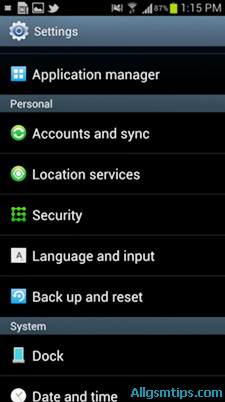
    1. Open the Menu
    2. Go to Settings
    3. Scroll to Backup and Reset
    4. Select Factory Data Reset
    5. Tap Reset Device
    6. Confirm by selecting Erase Everything

    The phone will restart automatically and begin the reset process.

    Factory Reset Samsung Galaxy S5 Using Settings

    Best used when:

    • Phone is working normally
    • Screen lock is known
    • No boot issues

    Method 2: Hard Reset Samsung Galaxy S5 Using Hardware Buttons

    This method is useful when:

    • Phone is locked
    • Touchscreen is not responding
    • Device is stuck on logo
    • Settings menu is inaccessible

    Button Combination Method (Recovery Mode)

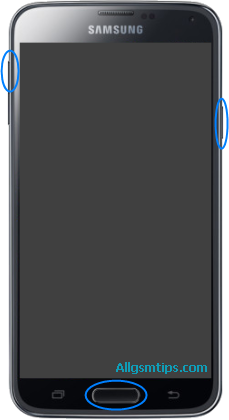
    Steps:

    1. Power off the Samsung Galaxy S5
    2. Press and hold:
      • Volume Up
      • Home button
      • Power button
    3. Release all buttons when the Android recovery screen appears
    4. Use Volume Down to navigate to Wipe data / factory reset
    5. Press Power button to select
    6. Choose Yes – delete all user data
    7. After completion, select Reboot system now

    The device will restart with factory settings.

    This is the most commonly used method by mobile repair technicians.

    Hard Reset Samsung Galaxy S5 Using Hardware Buttons

    Method 3: Factory Reset Using Dial Code (Advanced & Risky)

    Samsung devices support a reset code that forces formatting.

    Reset Code:

    *2767*3855#
    

    How it works:

    • Open the phone dialer
    • Enter the code exactly
    • The phone immediately starts resetting

    Important warnings:

    • No confirmation screen
    • No chance to cancel
    • Instant data deletion

    Use this method only if you fully understand the consequences.

    Factory Reset Samsung Galaxy S5 Using Dial Code

    Which Reset Method Should You Choose?

    SituationRecommended Method
    Phone working normallySettings reset
    Forgot pattern or PINButton method
    Phone stuck or frozenRecovery mode
    Technician-level useDial code

    Common Problems After Reset (And Solutions)

    Phone Asking for Google Account

    This is normal due to security protection.

    Solution:

    • Sign in with the previously linked Google account
    • If forgotten, proper account recovery is required

    Phone Still Slow After Reset

    Possible reasons:

    • Old hardware limitations
    • Storage wear
    • App compatibility issues

    Reset improves software, not aging hardware.


    Reset Did Not Fix the Problem

    If the issue continues, it may be:

    • Firmware corruption
    • Hardware fault
    • Power IC or memory issue

    In such cases, software flashing or professional repair may be required.

    Also read: What Is Mobile Phone Flashing and When Is It Needed? (internal link opportunity)


    Expert Tips for Safe Reset (From Repair Experience)

    • Always try reboot first
    • Avoid repeated resets unnecessarily
    • Do not interrupt the reset process
    • Keep phone connected to battery if possible
    • Use original button combinations only

    Reset Myths You Should Ignore

    • ❌ Reset improves battery health (false)
    • ❌ Reset fixes broken hardware (false)
    • ❌ Reset recovers deleted data (false)

    A reset only fixes software-level problems.


    Frequently Asked Questions (Quick Answers)

    Does hard reset remove viruses?
    Yes, most software-based malware is removed.

    Will reset unlock a stolen phone?
    No. Security protections remain active.

    Can data be recovered after reset?
    Usually no, unless backups exist.


    Final Thoughts

    Resetting a Samsung Galaxy S5 is a powerful troubleshooting step when used correctly. Whether you choose a factory reset from settings or a hard reset using buttons, the key is preparation and understanding.

    Use resets wisely, back up your data, and remember that not every phone problem needs formatting.

    A reset is a solution—not a shortcut.

  • Essential Tools for Beginner Cell Phone Repair Technicians

    Essential Tools for Beginner Cell Phone Repair Technicians

    Starting a career in mobile phone repairing can feel exciting and confusing at the same time. You see damaged smartphones every day—broken screens, weak batteries, charging issues, sound problems—and you know they can be fixed. But the first big question is simple:

    What tools do I actually need to start repairing phones properly?

    Many beginners make the mistake of buying random kits online or investing in expensive equipment too early. The truth is, successful technicians begin with the right basics, not with everything available in the market.

    This guide explains the essential tools for beginner-level phone repair work, why each one matters, and how to use them safely. Whether you want to fix Android devices, iPhones, or other mobile phones, this article will help you build a strong foundation.

    “Good repair work is not about speed. It is about accuracy, patience, and using the right tools at the right time.”

    It is not necessary to buy all of the tools. Instead you can get only those which are only essential, as some of them are required only if you are master technicians. For example, you will need soldering station and all other soldering related stuff only if you want to perform soldering. Otherwise you can just carry on with the basic tools.

    Without a proper set of tools you will not be able to open and then fix the handset.


    Understanding the Role of Tools in Mobile Repairing

    A smartphone has tiny screws, delicate connectors, fragile flex cables, and sensitive components. Using incorrect or low-quality equipment can cause more damage than the original fault.

    The right tools help you:

    • Open devices without breaking frames or glass
    • Remove and refit parts safely
    • Diagnose hardware problems accurately
    • Work faster with fewer mistakes
    • Build customer trust through professional work

    For beginners, the goal is not advanced micro-soldering on day one. The goal is safe disassembly, basic diagnosis, and correct replacement of common parts.

    Popular Cell Phone Repair Tool Companies

    It is very important to buy tools of high quality. For this you also need to know the best companies manufacturing this stuff. Below are some widely trusted tool manufacturers used in mobile phone repairing workshops around the world.

    • Sunshine
    • Mechanic
    • Relife
    • iFixit
    • 2UUL
    • QianLi
    • Hakko
    • Sugon
    • Yaxun

    Important Note

    No single brand is perfect for all tools. Most professional technicians build their toolkit gradually by combining:

    • Reliable brands
    • Personal comfort
    • Repair requirements

    It is always better to start with essential tools from trusted manufacturers and upgrade as your skills improve. When you wish to upgrade and start advanced level repairis, you will need to buy advanced chip-level and motherboard-level eMMC mobile repairing tools that most technicians of this level have.


    Basic Hand Tools Every Beginner Technician Must Have

    Precision Screwdriver Set

    Modern smartphones use very small screws. Different brands use different screw heads.

    A good precision screwdriver set usually includes:

    • Phillips
    • Pentalobe (commonly used in iPhone models)
    • Torx
    • Tri-point
    • Flat head

    Important tip:
    Always apply gentle pressure. Stripped screws are one of the most common beginner mistakes.

    Why it matters:
    Without the correct screwdriver, opening a device safely is almost impossible.


    Plastic Opening Tools and Spudgers

    Plastic tools are safer than metal when opening a phone.

    These tools help you:

    • Separate the screen from the body
    • Disconnect battery and display connectors
    • Pry open clips without scratching components

    Never use sharp metal objects on connectors. One slip can damage the motherboard.


    Suction Cup Tool

    A suction cup helps lift displays gently, especially in smartphones with tightly sealed screens.

    Used mainly for:

    • Screen replacement
    • Battery access
    • Back glass removal (with care)

    Practical insight:
    Warm the edges slightly before using a suction cup. This softens adhesive and reduces cracking risk.


    SIM Card Ejector Pin

    This simple tool is often overlooked.

    It is needed to:

    • Remove SIM trays before opening phones
    • Prevent tray damage during disassembly

    Using needles or pins can bend or break the tray.


    Essential Power and Heating Tools

    Hot Air Gun or Heat Pad

    Most smartphones use strong adhesive for screens and batteries.

    Controlled heat helps:

    • Loosen display adhesive
    • Remove batteries safely
    • Open sealed back panels

    Safety reminder:
    Too much heat can damage OLED screens, batteries, or internal sensors. Always use moderate temperature and patience.


    Adjustable Power Supply (Basic Level)

    At beginner stage, this is optional but useful.

    It helps with:

    • Checking short circuits
    • Power consumption testing
    • Understanding phone boot behavior

    Experience tip:
    Start learning power supply usage during training. It builds strong diagnostic skills early.


    Measuring and Testing Tools

    Digital Multimeter

    A multimeter is one of the most important diagnostic tools.

    It is used to:

    • Check continuity
    • Measure voltage
    • Identify short circuits
    • Test fuses and coils

    Important fact:
    Modern smartphones use digital sensors and ICs, so a multimeter cannot test everything. But it remains essential for basic hardware checks.


    USB Current Tester

    This tool shows how much current a phone draws while charging.

    Useful for diagnosing:

    • Dead phones
    • Charging issues
    • Power IC problems (basic understanding)

    Real-world example:
    A phone showing 0.00A while charging often points to charging port or power circuit issues.


    Cleaning and Maintenance Tools

    Isopropyl Alcohol (IPA)

    Used for:

    • Cleaning boards
    • Removing adhesive residue
    • Cleaning connectors and contacts

    Always use high-purity alcohol. Avoid water-based cleaners.


    Anti-Static Brush

    Helps remove dust and corrosion gently.

    Why it matters:
    Dust inside speakers, charging ports, and cameras can cause faults that look serious but are easy to fix.


    Microfiber Cloth

    Used for:

    • Cleaning displays
    • Final device finishing
    • Preventing fingerprints during assembly

    A clean finish improves customer satisfaction instantly.


    Soldering Tools (Beginner Awareness Level)

    Soldering Iron (Temperature Controlled)

    At beginner stage, soldering is usually limited to:

    • Charging port replacement
    • Speaker terminal repair
    • Simple wire jumpers

    Important:
    Avoid cheap, non-temperature-controlled irons. They cause board damage.


    Solder Wire and Flux

    • Use good-quality solder wire
    • Flux improves solder flow and reduces heat damage

    Practical insight:
    Clean solder joints always look shiny. Dull joints often mean weak connections.


    Safety Tools You Should Never Ignore

    Anti-Static Wrist Strap

    Prevents electrostatic discharge (ESD), which can silently damage ICs.

    Especially important when:

    • Handling motherboards
    • Working in dry environments

    Safety Glasses

    Glass shards from broken screens can cause eye injuries.

    Simple protection saves long-term problems.


    Heat-Resistant Gloves

    Useful while handling heated devices and batteries.


    Organizing Tools for Professional Work

    Magnetic Screw Mat

    Smartphones contain many screws of different sizes.

    A magnetic mat helps you:

    • Keep screws organized
    • Avoid mixing lengths
    • Prevent internal damage during reassembly

    Expert habit:
    Label screw positions while removing them.


    Tool Storage Box

    A clean workspace builds discipline.

    Organized tools mean:

    • Faster repairs
    • Fewer lost parts
    • Better customer confidence

    Common Beginner Mistakes With Tools

    Understanding mistakes is part of experience.

    Avoid these errors:

    • Using force instead of patience
    • Applying too much heat
    • Using metal tools near connectors
    • Mixing screws
    • Buying advanced tools without basics

    “In phone repair, most damage happens not because of lack of knowledge, but because of hurry.”


    Choosing Tool Quality: Cheap vs Reliable

    Beginners often ask whether low-cost kits are enough.

    Balanced advice:

    • Avoid extremely cheap tools
    • You don’t need premium brands initially
    • Focus on reliability and comfort

    A broken screwdriver tip can ruin a device costing thousands.


    Tools vs Skills: What Matters More?

    Tools alone do not make a technician.

    Skills come from:

    • Proper training
    • Supervised practice
    • Understanding phone design
    • Learning troubleshooting logic

    Good tools support your skills. They do not replace them.


    Building Your First Beginner Tool Kit (Summary List)

    For easy reference, a beginner toolkit should include:

    • Precision screwdriver set
    • Plastic opening tools
    • Suction cup
    • Heat gun or heat pad
    • Digital multimeter
    • USB current tester
    • Isopropyl alcohol (IPA)
    • Anti-static brush
    • Microfiber cloth
    • Magnetic screw mat
    • SIM ejector pin
    • Basic soldering iron (optional early)

    This setup covers most screen, battery, charging, speaker, and basic hardware repairs.


    Career Insight for New Repair Technicians

    Mobile phone repairing is not just about fixing devices. It is about problem-solving.

    You will work on:

    • Android smartphones
    • iPhones
    • Tablets
    • Different brands and designs

    Technology changes, but fundamental repair principles remain the same. Strong basics always win.


    Final Thoughts

    Starting phone repair work becomes much easier when you know what tools truly matter. You do not need everything at once. Begin with essentials, practice safely, and upgrade as your skills grow.

    Focus on:

    • Correct tools
    • Clean working habits
    • Patience and learning

    If you build your foundation properly, advanced repairs will feel natural later.

    A well-prepared technician fixes phones confidently, not forcefully.

  • What Are the Main Parts Inside a Cell Phone & Their Functions?

    What Are the Main Parts Inside a Cell Phone & Their Functions?

    Have you ever wondered what is inside your mobile phone? We use smartphones every day for calling, browsing, photography, payments, and work. Yet most people have no idea how many parts work together inside a small device to make all this possible.

    Understanding the internal parts of a cell phone is useful for many reasons. It helps users take better care of their devices. It helps students and beginners learn mobile technology basics. And for mobile repairing technicians, this knowledge is the foundation of troubleshooting and repair work.

    You don’t need to open a phone to respect it—just knowing what’s inside changes how you use it.

    In this guide, we will clearly explain the main parts inside a cell phone and their functions, using simple language and practical examples. The information applies to Android phones, iPhones, and most modern smartphones, with minor design differences across brands.


    External Parts vs Internal Parts of a Cell Phone

    Before going deeper, it is important to understand how mobile phone parts are broadly classified.

    External Parts

    External parts are the components you can see and touch from outside, such as:

    • Screen glass
    • Back panel
    • Side buttons
    • Camera lens cover
    • SIM tray

    These parts protect the phone and help with user interaction.

    Internal Parts

    Internal parts are located inside the phone body. These components handle power, processing, sound, display, connectivity, and sensors. Most phone problems occur due to issues with these internal components.

    This article focuses mainly on internal smartphone parts and how they work together.


    1. Motherboard (PCB / Logic Board)

    The motherboard, also called the PCB (Printed Circuit Board) or logic board, is the most important part inside a cell phone.

    It is usually green, blue, or black in color and holds all major electronic components.

    What the motherboard does:

    • Connects all internal parts
    • Distributes power across the phone
    • Controls communication between components
    • Houses critical chips and ICs

    In simple words:
    The motherboard is to a phone what an engine is to a car.

    Key components mounted on the motherboard:

    • Processor (CPU)
    • Memory chips
    • Power management IC
    • Network and signal ICs
    • Audio IC
    • Charging IC

    If the motherboard is damaged, the phone may not power on at all.


    2. Processor (CPU / SoC)

    The processor, also known as the CPU or System on Chip (SoC), is the brain of the smartphone.

    Function of the processor:

    • Executes apps and commands
    • Controls system operations
    • Handles multitasking
    • Processes camera and video data

    Modern processors combine multiple functions like graphics, AI processing, and connectivity into one chip.

    A faster processor improves:

    • App performance
    • Gaming experience
    • Camera processing
    • Power efficiency

    3. Battery

    The battery supplies power to the entire mobile phone.

    Most smartphones use lithium-ion or lithium-polymer batteries.

    Battery functions:

    • Stores electrical energy
    • Powers all phone components
    • Supplies voltage to the motherboard

    Typical smartphone batteries operate around 3.7V to 3.8V DC.

    Common battery-related issues:

    • Fast draining
    • Overheating
    • Phone not charging
    • Sudden shutdowns

    Important tip:
    Using poor-quality chargers can reduce battery life and damage charging circuits.


    4. Display (Screen Module)

    The display is the visual output unit of a smartphone.

    It allows users to:

    • See content
    • Watch videos
    • Read messages
    • Navigate apps

    Types of displays:

    • LCD (Liquid Crystal Display)
    • OLED / AMOLED displays

    All modern phones use display assemblies, where the screen and touch layer are fused together.


    5. Touchscreen (Digitizer)

    The touchscreen, also called the digitizer, is a transparent layer placed above the display.

    Function:

    • Detects finger touch
    • Converts touch into electrical signals
    • Sends input to the processor

    6. Microphone (Mic)

    The microphone converts sound into electrical signals.

    Types of microphones in smartphones:

    • Primary mic (for calls)
    • Secondary mic (for noise cancellation)

    Location:

    • Usually near the bottom of the phone
    • Sometimes near the camera for video audio

    If the mic fails:

    • The other person cannot hear your voice clearly
    • Voice recordings may sound distorted

    7. Earpiece Speaker (Receiver)

    The earpiece speaker, also called the receiver, is used during phone calls.

    Function:

    • Converts electrical signals into sound
    • Allows you to hear the caller’s voice

    It is located at the top front of the phone.

    Low sound during calls often indicates:

    • Dust blockage
    • Speaker damage
    • Audio IC issues

    8. Loudspeaker (Ringer / Buzzer)

    The loudspeaker, commonly called the ringer, produces loud sound.

    Used for:

    • Ringtones
    • Music
    • Videos
    • Notifications
    • Speakerphone calls

    If the loudspeaker is faulty:

    • Ringtones may be silent
    • Media sound may not work

    9. Vibration Motor

    The vibration motor creates vibration alerts.

    Function:

    • Rotates or oscillates to produce vibration
    • Alerts users silently during calls or notifications

    Modern phones use compact vibration motors that are power-efficient and precise.


    10. Antenna

    The antenna is responsible for signal transmission and reception.

    Handles:

    • Voice calls
    • Mobile data
    • Wi-Fi
    • Bluetooth
    • GPS

    In modern smartphones:

    • Antennas are internal
    • Integrated into the frame or PCB
    • Not visible from outside

    Weak signal issues are often related to antenna damage or loose connections.


    11. Charging Port (Charging Connector)

    The charging port connects the phone to a charger.

    Functions:

    • Charges the battery
    • Transfers data to computers
    • Supplies power to the motherboard

    Common problems include:

    • Loose charging
    • Slow charging
    • Phone not detected by PC

    Dust and moisture are the biggest enemies of charging ports.


    12. SIM Card Connector

    The SIM connector connects the SIM card to the motherboard.

    Function:

    • Identifies the user on the mobile network
    • Enables calling, messaging, and data services

    If damaged:

    • “No SIM” error appears
    • Network signal may drop

    13. Battery Connector

    The battery connector transfers power from the battery to the motherboard.

    It must:

    • Provide stable voltage
    • Maintain firm contact

    Loose connectors can cause random shutdowns.


    14. Flex Cables (Flex)

    Flex cables are thin, flexible connectors used inside phones.

    Used to connect:

    • Display
    • Touchscreen
    • Camera
    • Buttons
    • Sensors

    They allow compact internal design and easy component communication.


    15. Cameras (Front & Rear)

    Smartphones contain multiple cameras.

    Functions:

    • Photography
    • Video recording
    • Video calls
    • Face recognition

    Camera modules are connected to the motherboard via flex connectors.


    16. Fingerprint Sensor

    The fingerprint sensor provides biometric security.

    Types:

    • Rear-mounted
    • Side-mounted
    • In-display sensors

    It connects directly to the motherboard and works with secure system software.


    17. Power and Volume Buttons

    These switches allow physical control of the device.

    Functions:

    • Power on/off
    • Lock/unlock screen
    • Adjust volume
    • Take screenshots

    They are connected using flex cables or small switch boards.


    Plug-and-Play vs Soldered Components

    Internal phone parts are either:

    • Plug-and-play (connectors, speakers, cameras)
    • Soldered (ICs, chips)

    Important for technicians:
    Soldered parts require proper soldering skills and tools for repair.


    Why Knowing Phone Parts Is Important

    Understanding internal phone components helps:

    • Diagnose problems faster
    • Avoid unnecessary repairs
    • Use phones more carefully
    • Learn mobile repairing professionally

    Every phone problem tells a story—knowing the parts helps you read it correctly.


    Final Thoughts

    A cell phone may look simple from the outside, but inside it is a complex combination of electronic components working together in perfect coordination. From the motherboard to the smallest flex cable, every part has a specific role.

    Whether you are a curious user, a student, or an aspiring mobile repair technician, understanding the main parts inside a cell phone and their functions gives you clarity, confidence, and technical awareness.

    Knowing what’s inside your smartphone helps you use it smarter—and fix it better when something goes wrong.

  • Free Cell Phone Repair Guides And Tutorials

    Free Cell Phone Repair Guides And Tutorials

    Free Cell Phone Repair Tutorials

    You can easily learn cell phone repair for free with our free cell phone repair guides and tutorials. Here we are providing free training for people interested in learning the skills required to repair all types of smartphones, iPhones and tablets because tablets are also almost the same, nothing different! Also you have to keep in mind that the repair procedure for all mobile phones is almost same. All the following guides start from basics of repairs and also cover advanced troubleshooting methods.

    In the age of internet, you can learn anything like a do-it-yourselfer by getting access to proper manuals, tips, guides or tutorials. You will also need lots of practice and have to do trial and error until you learn a particular skill perfectly.

    Other than our guides which are for both beginners and experts, you can get loads of tips and information on many other tutorial websites. I have come across many people who have learned cell phone repair only through Google and YouTube! YouTube is the best resource to get free information of various mobile phone repair procedures and techniques.

    free cell phone repair tutorials

    Free Cell Phone Repair Lessons

    The topics covered are how to use various tools, how to check various parts and components inside a mobile phone the components, the printed circuit board (motherboard) description and all the stuff you need to learn. We are also providing here tips to start and successfully run your own cell phone repair business.

    How To Use A Multimeter In Mobile Phone Repairs

    How To Make Jumpers in Mobile Phones Repairs

    How To Test Or Check LCD Of A Cell Phone

    How To Check Battery Of A Cell Phone With Multimeter

    How To Check A Ringer (Loud Speaker) In Cell Phones

    How To Check A Mic In Cell Phones

    How To Check A Speaker In Cell Phones

    How To Check A Ringer (Loud Speaker) In Cell Phones

    How To Check Tracks On A PCB For Mobile Phone Repairs

    How To Use A Rework Station In Mobile Phone Repairing

    How To Repair A Water Damaged Smartphone

    How To Run A Cell Phone Repair Business – Easy Guide

    Default Security Codes Of All Cell Phones

    How To Factory Reset/Format A Cell Phone To Remove Virus

    How To Use Ultrasonic Cleaner Machine In Cell Phone Repairs

    How to Start A Cell Phone Repair Shop

    How To Check Shorting In Mobile Phones

    How To Remove Shorting In Mobile Phones

    List Of All Faults In Cell Phones

    How To Repair Your Cell Phone Yourself (DIY) – Easy Guide

    Other than the above mentioned topics, there are many other websites where you can get the information you need to learn cell phone repair.

    The other top sites for free cell phone repair guides and tutorials are

    1. iFixit: iFixit is among the top websites in the world for do-it-yourselfers. They have many guides for repairs of mobile phones, laptops, computers, iPhones, iPads and various other gadgets.
    2. GSM Forum: GSM forum is the world’s biggest and oldest forum of mobile phone technicians. Here all the oldies as well as newbies share the information for various techniques used to fix various models of phones and tablets. They have many different categories for different purposes. You should make it a habit to visit this site daily to increase you knowledge. Visiting it frequently helps you to keep yourself updated with the latest technology and developments.
    3. Another valueable theory resource: cellphonerepairtutorials.blogspot.com is a very good place to get all the basic knowledge of electronics. This website has a comprehensive list of many guides for beginners. Right from explanation of various parts and components to understanding the functioning of mobile communication, there are lots of topics which are useful as well as informative and is a must read for all the newbies.

    Read The 5 Best Mobile Repairing Institutes In Mumbai

    In addition to the above mentioned websites, there are various blogs, forums, Youtube channels, Whatsapp groups and Facebook groups which provide plenty of useful tips to newbie mobile repairing technicians. And all new technicians should have a passion of Googling and surfing Youtube for a few years daily to learn all those techniques and tricks which are essential to be learned by every mobile phone repair technician. Every technician must also follow mobile phone repair blogs to keep themselves updated.

    Note: All the above tips and tutorials are solely for information purpose. We do not guarantee the accuracy of any tip or technique.

    We have spent a lot of time writing these articles. So please share it on facebook and twitter to make it a success.

    Please keep visiting this page for getting more tips and updates.

    Please let us know if we can add any more important tutorials in this article.

  • How to Fix a Wet Cell Phone Step by Step (Water Damage Repair)

    How to Fix a Wet Cell Phone Step by Step (Water Damage Repair)

    Dropping a cell phone in water is one of the most stressful moments for any user. Whether it slips into a sink, falls into a bucket, gets soaked in rain, or lands in a toilet, the panic is real. Smartphones are expensive, personal, and deeply connected to daily life.

    The good news is this: a wet cell phone does not always mean a dead phone. Many water-damaged devices can be saved if the right steps are taken quickly and correctly.

    This guide explains how to fix a wet cell phone step by step, using practical, technician-approved methods. It covers what to do immediately, what to avoid, and when professional repair is the best option.

    “In water damage cases, speed and the right actions matter more than luck.”


    Understanding What Water Does to a Smartphone

    Before jumping into repair steps, it helps to understand what actually happens when a phone gets wet.

    Water itself is not the biggest enemy. The real damage comes from:

    • Electrical short circuits
    • Corrosion on internal components
    • Mineral deposits left behind after drying

    When a powered device meets moisture, current flows where it should not. This can damage chips, connectors, and the motherboard.

    That is why the first few minutes after water exposure are critical.


    Step 1: Remove the Phone From Water Immediately

    This step sounds obvious, but hesitation can be costly.

    • Take the mobile phone out of water as fast as possible
    • Do not press any buttons while removing it
    • Do not check if it is still working

    Every second the device stays powered and wet increases the risk of permanent damage.


    Step 2: Power Off the Device Right Away

    If the phone is still on, turn it off immediately.

    • Hold the power button and switch it off
    • Do not restart or unlock it
    • Do not check notifications

    Keeping a wet phone powered on is the biggest mistake users make.

    If the phone turns off by itself, do not try to turn it back on.


    Step 3: Remove All External Parts

    Next, strip the device down as much as possible without tools.

    Remove:

    • SIM card
    • Memory card
    • Phone case
    • Accessories like earphones or charging cables

    These parts can trap moisture and slow down drying.

    Place the SIM card and memory card separately on a dry cloth.


    Step 4: Gently Dry the Outside

    Use a soft, lint-free cloth to gently wipe the phone.

    • Pat dry the screen, back, and sides
    • Shake gently to remove water from ports
    • Keep charging port and speaker openings facing downward

    Do not use force. Do not insert anything into ports.

    This step only removes surface water. Internal moisture still remains.


    Step 5: Do NOT Do These Common Mistakes

    Many well-known “home remedies” actually make water damage worse.

    Avoid the following:

    • ❌ Using a hair dryer or heat gun
    • ❌ Placing the phone on a heater
    • ❌ Microwaving the phone (extremely dangerous)
    • ❌ Charging the phone to “check if it works”

    Heat can:

    • Warp internal components
    • Push moisture deeper inside
    • Damage battery cells

    “Heat dries water fast—but it destroys electronics even faster.”


    Step 6: Use Controlled Air Drying

    The safest drying method is time and airflow, not heat.

    What you can do:

    • Place the phone on a dry towel
    • Keep it in a well-ventilated room
    • Use a fan at a distance to improve air circulation

    Position the device so that:

    • Charging port faces downward
    • Speaker grills are not blocked

    Leave it undisturbed.


    Step 7: Silica Gel vs Rice – What Actually Works?

    The Truth About Rice

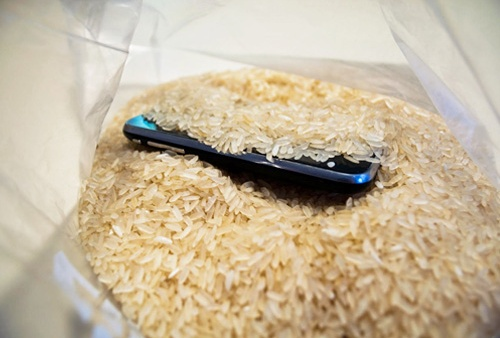
    Some people keep their phone submerged in unccoked rice for a few hours. Rice absorbs moisture slowly and unevenly. It can also leave dust and starch particles inside ports.

    Rice is better than nothing, but not ideal.

    Silica Gel (Much Better Option)

    Silica gel packets:

    • Absorb moisture efficiently
    • Do not leave residue
    • Are used in professional drying environments

    If available:

    • Place the phone in a sealed container
    • Add silica gel packets around it
    • Leave for at least 24–48 hours
    rice method for fixing wet cell phone

    Silica gel is safer and more effective than rice. However this will work only if the wetness is little and at the start of the holes/gaps.


    Step 8: Wait Long Enough Before Powering On

    Patience is critical.

    Recommended waiting time:

    • Minimum: 24 hours
    • Safer range: 48 hours or more

    Do not rush this step. Moisture trapped under chips and connectors takes time to evaporate.

    Turning on the phone too early can permanently short the motherboard.


    Step 9: Power On and Observe Carefully

    After sufficient drying time:

    • Power on the device
    • Do not plug in the charger yet
    • Check basic functions

    Test:

    • Screen display
    • Touch response
    • Speaker sound
    • Microphone
    • Camera

    If the phone does not turn on, do not panic. This does not always mean it is dead.


    Step 10: If the Phone Turns On but Shows Problems

    Common post-water-damage issues include:

    • No sound
    • Charging problems
    • Foggy camera lens
    • Random shutdowns

    These issues often indicate:

    • Residual moisture
    • Corrosion starting on connectors

    At this stage, professional cleaning is recommended.


    When to Take the Phone to a Repair Technician

    You should visit a repair professional if:

    • The phone does not power on after drying
    • The phone heats up abnormally
    • Charging is unstable
    • Display flickers or touch fails

    Technicians use:

    • Isopropyl alcohol cleaning
    • Ultrasonic cleaners
    • Board-level inspection

    Early professional intervention can prevent long-term corrosion.


    Water-Resistant vs Waterproof Phones: Know the Difference

    Many smartphones are advertised as water-resistant.

    Important points:

    • Water resistance is not permanent
    • Seals degrade over time
    • Drops, repairs, or wear reduce protection

    Water-resistant does not mean water-proof.
    Damage can still occur, especially in saltwater or dirty water.


    Saltwater and Dirty Water: Extra Risk

    If the phone fell into:

    • Sea water
    • Pool water
    • Muddy or dirty water

    The risk is higher due to:

    • Salt corrosion
    • Chemical residue
    • Mineral deposits

    In such cases, professional cleaning is strongly advised, even if the phone seems fine.


    Battery Safety After Water Damage

    Lithium-ion batteries are sensitive to moisture.

    Warning signs:

    • Phone gets hot
    • Battery drains fast
    • Swelling or bulging

    If any of these occur:

    • Stop using the phone
    • Do not charge it
    • Seek professional help

    Battery failure can be dangerous if ignored.


    Data Recovery From a Water-Damaged Phone

    Even if the phone does not fully recover:

    • Data may still be retrievable
    • Storage chips often survive

    Technicians can:

    • Access internal memory
    • Recover photos, videos, and documents

    This is another reason not to attempt risky DIY fixes.


    Can You Fix Water Damage at Home Completely?

    Minor water exposure can sometimes be handled at home if:

    • The phone was powered off quickly
    • Drying was done correctly
    • No corrosion started

    However, deep water damage often requires professional tools.

    Home methods reduce risk—but they do not replace proper cleaning.


    Preventing Water Damage in the Future

    Simple habits reduce risk:

    • Use waterproof cases near water
    • Avoid using phones in bathrooms
    • Keep devices away from kitchen sinks
    • Do not charge phones near liquids

    Prevention is always cheaper than repair.


    Technician-Level Insight: Why Some Phones Die Later

    Some phones work fine after drying, then fail weeks later.

    Reason:

    • Hidden corrosion slowly eats circuit paths

    This is why technicians recommend internal cleaning, not just drying.

    “Water damage is not always immediate. Sometimes it waits.”


    Repair or Replace: Making the Right Decision

    Consider replacing the phone if:

    • Motherboard damage is severe
    • Repair cost is too high
    • The phone is very old

    Repair makes sense if:

    • Damage is caught early
    • Device value is high
    • Data is important

    A technician can help evaluate honestly.

    Frequently Asked Questions (FAQs)

    1. Can a wet cell phone be repaired completely?

    Yes. Many wet cell phones can be repaired if they are powered off quickly and dried properly. Early professional cleaning greatly improves success.


    2. How long should I wait before turning on a water-damaged phone?

    If you are not giving the handset for repairs. you should wait at least 24–48 hours after proper drying. Turning it on too early can cause permanent internal damage.


    3. Does putting a wet phone in rice really work?

    No. Rice can absorb very little moisture, but it is not very effective. Silica gel packets work better but only if the water is minimum and at the border only.


    4. Can water damage affect a phone later even if it works now?

    Yes. Corrosion can develop slowly and cause problems days or weeks later if the phone is not cleaned internally.


    5. Should I repair or replace a water-damaged smartphone?

    Repair is worth it if the phone is newer or data is important. Replacement may be better if repair costs are high or damage is severe.


    Final Thoughts

    A wet cell phone is not automatically a lost cause. Quick action, correct steps, and patience can save many water-damaged smartphones.

    The most important rules to remember:

    • Power off immediately
    • Avoid heat and charging
    • Allow proper drying time
    • Seek professional help when needed

    Smart handling can mean the difference between recovery and permanent failure.

  • Is Mobile Repairing Business A Good Future Career Choice in India?

    Is Mobile Repairing Business A Good Future Career Choice in India?

    Before choosing any career, one basic question matters the most: Will this field still be relevant and rewarding in the coming years?
    This question becomes even more important when you are planning a skill-based career or a small business.

    Mobile repairing is one such field that creates confusion. Some people say the market is crowded. Others believe smartphones are becoming too advanced to repair. At the same time, thousands of technicians across India are earning stable incomes from mobile phone repair shops, service centers, and freelance work.

    We have seen the trend of many technicians who have passed out of leading mobile repairing institutes in Mumbai and India who are successfully running their mobile repairing shops and are successful businessmen today. While there are many of them who are doing jobs as technicians all over India or abroad. Students from Prizm Institute – a leading mobile repairing course institute in Mumbai are at the forefront who are either working in authorized service centers or have started their own mobile repairing shops all over.

    So what is the reality?

    Let us break it down honestly and clearly, based on real industry trends, technician experience, and how smartphones are actually used today.

    “A career is not decided by trends alone, but by how essential the skill remains in everyday life.”


    Understanding the Mobile Repairing Business Today

    Mobile repairing means diagnosing and fixing faults in smartphones, Android devices, iPhones, tablets, and other handheld gadgets. The work includes both hardware and software-level repairs.

    Common services include:

    • Screen replacement and glass repair
    • Charging port and battery replacement
    • Speaker, microphone, and camera repairs
    • Software flashing and OS issues
    • Lock problems like pattern, PIN, and account verification locks
    • Motherboard-level troubleshooting

    This is not a niche market. It is a mass requirement because mobile phones are no longer luxury items. They are daily-use devices for communication, payments, work, education, and entertainment.


    Why People Doubt the Future of Mobile Repairing

    Before talking about opportunities, it is important to address common concerns that stop people from choosing this field.

    1. “There Is Too Much Competition”

    Yes, there are many mobile repair shops across India. But there are also hundreds of millions of mobile phone users. Every day, devices fall, batteries weaken, software crashes, and ports stop working.

    Any business that has demand will have competition. The real difference is made by:

    • Skill level
    • Service quality
    • Honest pricing
    • Speed of repair

    Competition does not kill a business. Lack of skill does.


    2. “Mobile Repairing Is Not as Profitable as Before”

    This statement is only partially true.

    Basic repairs like simple software jobs may not pay as much as earlier. But new types of repairs have replaced old ones.

    Today, higher-value work includes:

    • Display replacement and OCA glass work
    • Charging IC and power IC repairs
    • Face ID and fingerprint sensor issues
    • Board-level chip replacement and reballing
    • Data recovery and advanced diagnostics

    Technicians who upgrade their skills earn more than those who stick only to basic repairs.


    3. “Profit Margins Have Reduced”

    Margins depend heavily on:

    • Shop location
    • Type of customers
    • Range of services offered

    A small shop offering only screen guards and basic flashing will struggle.
    A full-service repair center offering repair, accessories, resale, and pickup-drop services earns consistently.

    In many urban and semi-urban areas, experienced technicians earn more today than they did earlier because smartphone repair costs have increased along with device prices.

    So there is a lot of scope in mobile repairing business even now. The only thing is you need to run it properly and use common business sense. While at the same time, you can also see the average salary of mobile phone repair technicians which is on the higher side due to good profit margins.


    4. “Many People Leave This Field After Failing”

    This is true for every business and profession.

    Some people:

    • Enter without proper training
    • Lack patience for troubleshooting
    • Do not understand customer handling
    • Expect quick money without effort

    Mobile repairing is a technical skill plus a service business. Those who respect both aspects survive and grow.


    Strong Reasons Why Mobile Repairing Has a Solid Future

    Now let us look at the positive side, supported by real-world usage and industry behavior.


    1. Smartphones Are Not Going Anywhere

    To replace smartphones, a new device would need to be:

    • Portable
    • Affordable
    • Powerful
    • Easy to carry everywhere

    At present, nothing replaces a mobile phone better than another mobile phone.

    Smartphones are deeply integrated into:

    • Banking and payments
    • Government services
    • Online education
    • Work-from-anywhere jobs
    • Health tracking and communication

    As long as people use smartphones, repairing them will remain necessary.


    2. Rising Prices of Smartphones Increase Repair Demand

    Modern smartphones are expensive. Many users prefer repair over replacement.

    This directly benefits technicians because:

    • Screen replacement costs are higher
    • Board-level repairs command premium charges
    • Original parts and quality repairs are valued

    Higher device value = higher repair value.


    3. Frequent Damage and Wear Is Inevitable

    No matter how advanced a mobile phone is:

    • Batteries degrade
    • Screens crack
    • Ports loosen
    • Software bugs appear

    These are not rare problems. They are everyday issues.
    This ensures consistent walk-in customers for repair shops.


    4. Low Investment, High Skill Value Business

    Starting a mobile repairing business does not require huge capital.

    Basic requirements include:

    • Proper training from a technical institute
    • Essential tools and equipment
    • Small shop or workstation
    • Initial spare parts stock

    Compared to many other businesses, the entry barrier is low, but the skill value is high.


    5. Multiple Income Streams From One Skill

    A trained technician can earn from:

    • Repair services
    • Accessories sales
    • Refurbished phone resale
    • Software services
    • Freelance repair work
    • Jobs in service centers

    This flexibility makes mobile repairing both a career and a business opportunity.


    6. Scope in Small Towns and Big Cities Alike

    Mobile repairing is not limited to metros.

    In fact:

    • Tier 2 and tier 3 cities have less skilled competition
    • Villages rely heavily on local technicians
    • Urban areas support premium repair services

    A “one-stop mobile solution” shop performs well almost everywhere.


    7. Growing Demand for Skilled Technicians

    Authorized service centers, refurbishing companies, and electronics brands constantly need trained technicians.

    Those with hands-on experience and motherboard-level knowledge often get better opportunities and pay packages.


    Skills That Decide Success in Mobile Repairing

    Not everyone earns the same income. The difference lies in skill depth.

    Important skills include:

    • Fault diagnosis and logic building
    • Soldering and micro-soldering
    • Understanding smartphone architecture
    • Software troubleshooting
    • Customer communication

    The technician who keeps learning stays relevant.


    Real-Life Insight From the Industry

    Many technicians who started with small shops now:

    • Run multiple outlets
    • Supply refurbished devices
    • Train other technicians
    • Work with corporate clients

    On the other hand, those who did not update their skills slowly moved out.

    This clearly shows that the future depends on the technician, not the trade.

    “Skills that solve real problems never lose value.”


    Pros and Cons of Choosing Mobile Repairing as a Career

    Advantages

    • Low startup cost
    • Quick skill-based entry
    • Daily cash flow
    • High demand service
    • Flexible career path

    Challenges

    • Requires patience and practice
    • Continuous learning is necessary
    • Initial income may be slow
    • Precision work needs focus

    A balanced view helps set realistic expectations.


    Is Mobile Repairing Better Than Many Traditional Careers?

    For people who:

    • Prefer practical work
    • Want self-employment
    • Do not want long academic routes
    • Want early earning potential

    Mobile repairing can be a strong alternative to many conventional jobs.


    How to Improve Long-Term Success

    Some practical tips:

    • Learn from a reputed training institute
    • Focus on quality, not shortcuts
    • Invest in tools gradually
    • Build trust with customers
    • Keep upgrading skills

    Also read: How to Choose the Right Mobile Repairing Course
    Also read: Common Mistakes New Mobile Technicians Should Avoid


    Final Thoughts

    Mobile repairing is not a dying career. It is a skill-driven profession that evolves with technology.

    Those who treat it casually may struggle.
    Those who treat it professionally can build a stable and respectable career.

    The future of mobile repairing in India remains strong, practical, and opportunity-rich for people willing to learn and adapt.