IWhen a customer says, “I can hear on loudspeaker but not during calls,” the problem often points to the ear speaker, also known as the receiver.
This is one of the most common audio complaints in smartphones, Android devices, and iPhones.
Fixing it is not about guessing.
It is about systematic checking.
“Good repair work is not about speed. It’s about knowing exactly where to look.”
This guide explains how to check a mobile phone ear speaker step by step, using practical methods that technicians rely on daily.
Whether you work on Android phones, iPhones, or feature phones, the logic remains the same.
What Is an Ear Speaker (Receiver) in a Mobile Phone?
The ear speaker is the small internal speaker placed near the top of a phone.
It allows users to hear the caller’s voice during normal calls, without enabling loudspeaker mode.
Other Common Names Used by Technicians
- Receiver
- Call speaker
- Top speaker
- In-call speaker
- Voice speaker
Do not confuse it with:
- Loudspeaker (bottom speaker)
- Ringtone speaker
- Media speaker
Each one has a different circuit path.
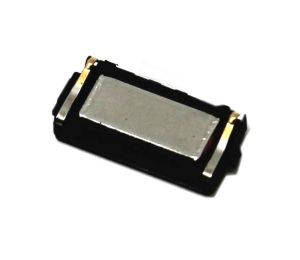
Common Symptoms of a Faulty Ear Speaker
Before opening a device, always understand the complaint clearly. If you do not hear phone speaker sounds during calls and just hear music and multimedia sound, then it means your phone receiver (ear speaker) is not working.
Typical Problems Reported
- No sound during calls
- Very low voice while calling
- Sound works only on loudspeaker
- Distorted or crackling voice
- Intermittent sound when pressing the top area
- Sound disappears after water exposure
- Works with headphones but not directly
If the loudspeaker works but the ear speaker does not, the issue is localized, not system-wide.
Tools Required to Check an Ear Speaker
A technician does not need advanced equipment for initial diagnosis.
Basic Tools
- Known-good SIM card
- Working earphones
- Soft brush
- Isopropyl alcohol (IPA)
- Screwdrivers
- Multimeter (continuity and resistance mode)
Optional Advanced Tools
- DC power supply
- Service box or diagnostic app
- Schematic or block diagram (if available)
Here is a list of essential and basic cell phone repair tools all beginner technicians shoul have.
Step 1: Basic Call Test (Most Important First Step)
Always begin with non-invasive testing.
How to Perform
- Insert a working SIM card.
- Make a normal voice call.
- Do not enable loudspeaker.
- Increase call volume using volume keys.
- Place the phone close to your ear.
What to Observe
- Clear sound → Ear speaker is fine
- Low sound → Mesh blockage or weak receiver
- No sound → Continue diagnosis
Never open a phone before confirming the issue through a call test.
Step 2: Check Using Loudspeaker Comparison
This step helps isolate the problem.
Method
- During the same call, enable loudspeaker.
- If loudspeaker audio is clear:
- Microphone and network are working
- Audio codec is likely fine
- Problem is receiver-side
If both ear speaker and loudspeaker fail, the issue may be:
- Audio IC
- Software
- Network
- Call settings
Step 3: Test with Headphones or Earphones
This is a fast and reliable check.
Results Interpretation
- Sound works with earphones → Receiver or path issue
- Sound does not work → Deeper audio problem
If sound switches correctly when earphones are plugged in, the phone’s audio routing is functioning.
Step 4: Check Call Settings and Software Audio Paths
Many phones today have software-level audio controls.
Things to Check
- Call volume set to maximum
- Accessibility settings (mono audio, hearing aid mode)
- Call recording apps interfering
- Bluetooth disconnected
- Safe mode test (Android)
Restart the device once before proceeding.
A simple restart solves more problems than most people expect.
Step 5: Visual Inspection and Cleaning
Dust and sweat are silent killers of ear speakers.
Cleaning Method
- Power off the phone.
- Remove top mesh or grill (if accessible).
- Use a soft brush.
- Lightly clean with IPA.
- Let it dry fully.
Many “dead receivers” come back to life after cleaning.
Step 6: Swap Test with a Known-Good Receiver
This is a technician’s shortcut.
How It Helps
- If replacement receiver works → Original is faulty
- If replacement also fails → Path or board issue
Always test with:
- Same model
- Same impedance rating
Step 7: Multimeter Test (Receiver Resistance Check)
This step confirms whether the ear speaker coil is open.
Typical Resistance Values
- Usually between 25Ω and 60Ω
- Depends on model
Procedure
- Remove the ear speaker.
- Set multimeter to resistance (Ω).
- Touch probes to speaker terminals.
Readings
- Normal resistance → Speaker is electrically fine
- No reading / infinite → Coil open, replace speaker
- Zero resistance → Shorted speaker
This test is reliable and fast.
Step 8: Check Receiver Line Continuity on PCB
If the receiver is fine, check the signal path.
What to Check
- Receiver connector pins
- Audio line continuity
- Ground path
- Series resistors
- EMI filters
Use continuity mode on a multimeter.
Broken tracks often occur after:
- Drops
- Water damage
- Poor previous repairs
Step 9: Check Audio IC and Power Supply (Advanced)
This is required only if:
- Receiver is good
- Tracks are fine
- Software is ruled out
Indicators of Audio IC Issues
- No sound in any mode
- Heating near codec IC
- Sound works only sometimes
- Crackling across outputs
At this stage, experience matters more than tools.
Step 10: Water Damage Considerations
Water damage affects ear speakers first.
Signs
- Green corrosion near receiver pads
- Rust on connector
- White residue
Action
- Clean PCB properly
- Check under microscope if available
- Replace receiver even if it looks fine
Water damage is never just “dry and done.”
Common Mistakes Technicians Make
Avoid these errors:
- Replacing receiver without testing
- Ignoring software settings
- Not checking ear mesh
- Skipping continuity checks
- Overheating near audio IC
Good repair is about logic, not shortcuts.
Ear Speaker vs Loudspeaker: Quick Comparison
| Feature | Ear Speaker | Loudspeaker |
|---|---|---|
| Used for | Calls | Media, ringtone |
| Location | Top | Bottom |
| Power | Low | High |
| Common fault | Dust, coil open | Distortion |
When to Replace vs Repair
Replace Receiver If
- Coil is open
- Sound is distorted
- Volume is permanently low
Repair Path If
- Connector is loose
- Track is broken
- Pad is damaged
Practical Technician Tips
- Always keep tested receivers in stock
- Label removed parts
- Avoid touching receiver diaphragm
- Never blow air directly into mesh
- Test before full reassembly
“A repair is only complete after final testing.”
Final Checklist Before Returning the Phone
✔ Call test completed
✔ Volume stable
✔ No distortion
✔ Proximity sensor working
✔ No loose connections
Conclusion
Checking a mobile phone ear speaker is not guesswork.
It is a step-by-step diagnostic process that saves time, parts, and reputation.
By following the methods explained above, technicians can:
- Identify faults accurately
- Avoid unnecessary replacements
- Deliver consistent results
A phone may be small, but precision matters.