Finding a job as a mobile phone repair technician becomes much easier when you have a clear and professional resume. Many skilled technicians struggle with job applications not because they lack skills, but because their resume, CV, or bio-data is poorly written or confusing.
A good resume does not need big English words or complicated formats. It only needs to clearly show what you can repair, what experience you have, and how an employer can contact you. Whether you are a fresher learning mobile repair or an experienced technician handling Android phones and iPhones daily, a simple and correct resume makes a strong first impression.
“Skills open the door, but a good resume helps you walk through it.”
This guide explains how to create a mobile phone repair technician resume, also known as a CV (Curriculum Vitae) or bio-data, and provides ready-to-use editable samples you can download and modify.
What Is Inside a Mobile Phone Repair Technician Resume?
A mobile repair technician resume is a short document that explains:
- Your repair skills
- Your work experience
- The type of phones and devices you can handle
- Your contact details
In different countries, the same document may be called:
- Resume
- CV (Curriculum Vitae)
- Bio-data
- Job profile
- Technician profile
All these terms mean the same thing in practical job applications.
Why a Simple Resume Works Best for Technicians
Many technicians think a resume must look fancy. This is not true.
Workshop owners, service centers, and mobile repair shops look for:
- Clear skills
- Honest experience
- Practical knowledge
- Easy-to-read information
A simple resume gets more callbacks than a complicated one.
Important Sections Every Technician Resume Must Have
No matter your experience level, your resume should include only these essential sections.
1. Personal Details
- Name
- Mobile number
- Email (if available)
- City or area
Keep this short and clear.
2. Career Objective or Summary
This is 1–2 lines about your goal.
Example:
- To work as a mobile phone repair technician and grow my technical skills.
Avoid long paragraphs.
3. Technical Skills (Most Important Section)
This is what employers read first.
Mention skills such as:
- Android phone repair
- iPhone repair
- Battery replacement
- Charging problem repair
- LCD screen replacement
- Software flashing
- Fault diagnosis
Always write only what you can actually do.
4. Work Experience
If you have experience, mention:
- Number of years
- Type of shop or service center
- Devices handled (Tablets, iPhones, Android phones)
If you are a fresher, write:
- Trainee or fresher
- Practical training experience
5. Education or Training
This can be simple:
- School education
- Mobile phone repairing course
- ITI or short-term training
Education level is less important than repair skills in this field.
Resume Tips from Real Repair Experience
- Do not write false experience
- Do not use copied online resumes
- Keep resume to one page
- Avoid spelling mistakes
- Use simple language
“Honest skills last longer than fake experience.”
Resume Format for Different Experience Levels
To make it easy, below are three ready resume formats based on skill level.
1. Basic Resume (For Freshers)
Best for:
- Freshers
- New learners
- Trainees
Focus:
- Basic repair skills
- Willingness to learn
2. Intermediate Resume (1–3 Years Experience)
Best for:
- Shop technicians
- Service center helpers
Focus:
- Repair skills
- Daily repair work
- Software and hardware skills
3. Advanced Resume (Experienced Technicians)
Best for:
- Senior technicians
- Board-level repair workers
Focus:
- Hardware and software repair skills
- IC work
- Advanced fault diagnosis
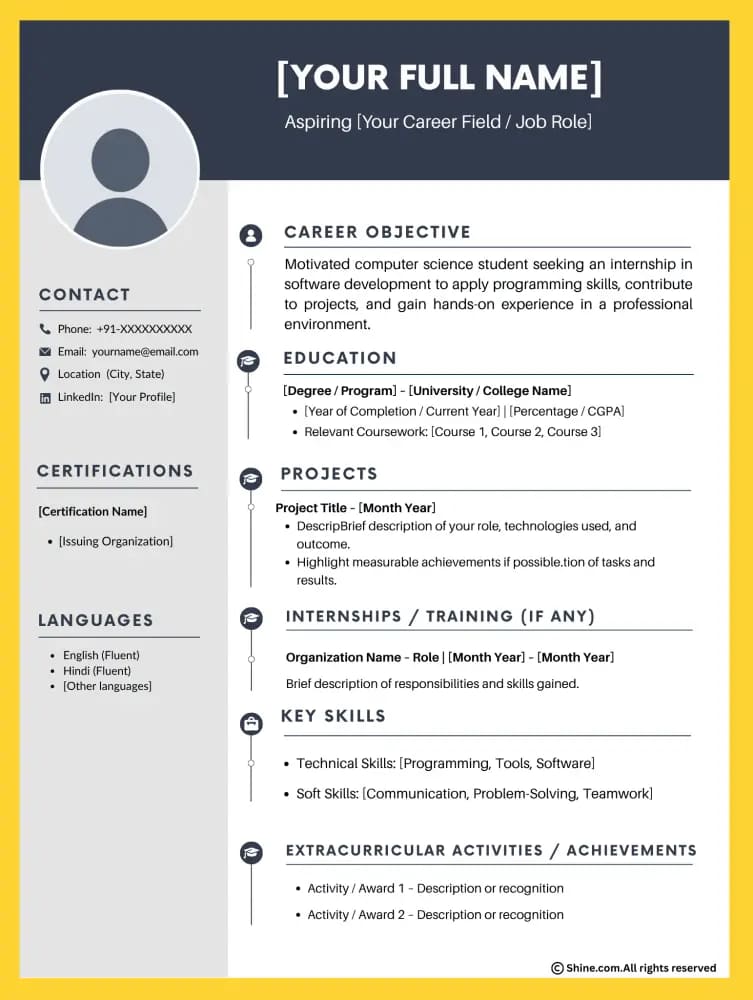
Free Download: Editable Resume Samples (MS Word)
You can download and edit these resumes easily on mobile or computer.
📄 Resume Downloads
- 👉 Basic Mobile Repair Technician Resume (MS-Word)
Download - 👉 Intermediate Mobile Repair Technician Resume (MS-Word)
Download - 👉 Advanced Mobile Repair Technician Resume (MS-Word)
Download
These files are:
- Editable in MS Word
- Simple and clean
- Suitable for job applications
- Easy to understand for technicians
Resume vs CV vs Bio-Data: Which One Should You Use?
- Resume → Common in the United States and service centers
- CV (Curriculum Vitae) → Common globally
- Bio-data → Common in India and Gulf countries
You can use the same format for all. Only the name changes.
Common Resume Mistakes Technicians Should Avoid
- Writing long stories
- Adding unrelated jobs
- Using difficult English
- Mentioning skills you don’t know
- Using decorative designs
Clear information matters more than design.
Who Can Use These Resume Samples?
These resume formats are suitable for:
- Mobile phone repair technicians
- Smartphone service center staff
- Android repair technicians
- iPhone repair technicians
- Freshers and experienced workers
Free Apps to Create a Professional Resume
If you do not have a computer, you can still prepare a professional resume, CV (Curriculum Vitae), or bio-data using free mobile apps. These apps are easy to use and suitable for mobile phone repair technicians, even if you are not highly educated.
Below are trusted, free apps with official download links.
1. Indeed Resume Builder (Free)
Indeed offers a free resume builder inside its official job search app.
Download links:
- Android (Google Play):
https://play.google.com/store/apps/details?id=com.indeed.android.jobsearch - iPhone (App Store):
https://apps.apple.com/app/indeed-job-search/id309735670
Why technicians use it:
- Very simple and clean resume format
- Professional look
- Good for freshers and basic technicians
- Resume can be downloaded as PDF
2. Resume Builder – CV Maker (Android)
Several free resume apps are available on Android under this name.
Download link (Android):
Why it is useful:
- Step-by-step resume filling
- Easy bio-data style formats
- No design or English expertise needed
Best for Android users and entry-level technicians.
Tip: Always choose simple and professional templates, not colorful ones.
3. Microsoft Word Mobile (Free)
Microsoft Word mobile app is best for editing resume or bio-data files.
Download links:
- Android (Google Play):
https://play.google.com/store/apps/details?id=com.microsoft.office.word - iPhone (App Store):
https://apps.apple.com/app/microsoft-word/id586447913
Why it is recommended:
- Very simple and professional
- Works perfectly with Word resume samples
- Accepted by all employers
4. Google Docs (Free)
Google Docs also provides resume templates and easy editing.
Download links:
- Android (Google Play):
https://play.google.com/store/apps/details?id=com.google.android.apps.docs.editors.docs - iPhone (App Store):
https://apps.apple.com/app/google-docs/id842842640
Why it is useful:
- Completely free
- Auto-save feature
- Easy sharing with employers
Final Thoughts
A mobile phone repair technician does not need a complicated resume. What matters is clarity, honesty, and practical skills. A clean resume shows professionalism and helps employers trust your abilities even before meeting you.
If you update your resume as your skills grow, it becomes a strong career tool.